
QuickBooks remains a trusted accounting platform for businesses across industries, but construction firms quickly discover its limitations when managing complex, multi-project operations. While QuickBooks handles basic accounting functions well, it lacks the construction-specific tools needed for advanced job costing, equipment tracking, subcontractor management, and field productivity tracking.
This is where QuickBooks ERP integration becomes valuable. By connecting QuickBooks with a construction-focused ERP system, contractors gain access to specialized features while maintaining their existing accounting workflows. The right QuickBooks integration software eliminates double data entry, improves project visibility, and provides real-time financial insights across all job sites.

Construction companies face unique operational challenges that generic accounting software cannot address effectively. Managing multiple projects simultaneously requires tracking labor costs across different job sites, monitoring equipment utilization, coordinating subcontractor invoices, and ensuring compliance with union requirements and prevailing wage laws.
QuickBooks alone struggles with these construction-specific needs. Job costing features in standard QuickBooks are basic at best, making it difficult to accurately track project profitability. Equipment management is virtually nonexistent, forcing contractors to maintain separate spreadsheets. Subcontractor management lacks the depth needed to handle complex billing scenarios, change orders, and retention tracking.
Beyond these functional gaps, QuickBooks provides limited visibility into real-time project status. Construction managers need instant access to budget-versus-actual comparisons, projected costs to complete, and resource allocation across multiple jobs. Without this information readily available, firms risk cost overruns and missed profit opportunities.
Integrating QuickBooks with a construction ERP system solves these problems. A proper QuickBooks ERP system maintains the familiar accounting interface while adding powerful construction management capabilities. Financial data flows automatically between systems, eliminating manual entry errors. Project managers gain access to real-time job costing information without switching platforms. Accounting teams continue to use QuickBooks for financial reporting, while field teams use specialized tools designed for construction workflows.
The benefits extend beyond operational efficiency. Integrated systems improve cash flow management by providing accurate, up-to-date financial visibility. They enhance decision-making through better reporting and analytics. They reduce compliance risks by automating certified payroll and prevailing wage calculations. Most importantly, they allow construction firms to scale operations without overhauling their entire accounting infrastructure.
Lumber is a comprehensive workforce management platform specifically designed for construction companies, with seamless two-way synchronization with QuickBooks. It handles the complex requirements of construction payroll, time tracking, and compliance reporting while maintaining data accuracy between both platforms.
The integration syncs company information, employee records, and project details from QuickBooks to Lumber. In return, timesheet data and payroll journals flow from Lumber back to QuickBooks, eliminating double entry and reducing processing time by up to 90%. The system automatically handles union payroll, multi-state requirements, and prevailing wage reporting, which are critical for contractors working on government projects.
Lumber’s mobile time tracking includes geo-tagging to verify employee locations and hours worked. Equipment-tracking features monitor usage and project-level costs. The system also manages certified payroll with built-in formats for federal and state compliance, including Davis-Bacon Act requirements.
For general contractors managing multiple projects and crews, Lumber provides real-time labor cost visibility and scheduling tools. Specialty contractors benefit from customizable job classifications and union requirement management. Residential builders gain simplified crew management and budget versus actual tracking.
The setup process typically takes 1-2 weeks, with Lumber’s team handling the technical configuration. Training is included, along with dedicated support and regular check-ins during implementation. Security features include encrypted data transfers, regular backups, and role-based access controls.
Procore offers construction project management with financial tools that integrate with both QuickBooks Online and QuickBooks Desktop. This integration connects project management and accounting teams by synchronizing cost data and standardizing processes.
The Procore QuickBooks connector syncs project codes, vendor information, purchase orders, commitments, change orders, and invoices between systems. Direct cost data and budget information flow from QuickBooks into Procore, while approved invoices and payment applications export from Procore to QuickBooks. The integration reduces manual double-entry and improves communication between field and office teams.
For QuickBooks Online users, the connector supports custom work breakdown structure segments and enables owner invoice exports. QuickBooks Desktop integration uses the Web Connector tool for automatic data synchronization. Both integration options provide instant access to job costing information for project managers without requiring them to log in to QuickBooks.
Procore works best for contractors managing new construction projects, as existing or in-progress projects require professional services assistance to integrate. The system supports companies running multiple simultaneous projects that need centralized cost tracking and financial oversight.
Limitations include the requirement for separate third-party connectors in some cases, which adds cost and complexity. The integration is designed for one QuickBooks company file per Procore account, which may not suit firms with multiple legal entities. Additionally, some users report challenges with real-time syncing and budget tracking flexibility.

Foundation Software provides construction accounting software built specifically for contractors, with integration capabilities for firms transitioning from QuickBooks. While not a direct integration in the traditional sense, Foundation offers data conversion services and can work alongside QuickBooks through careful implementation.
This construction-focused platform excels at job costing, providing detailed cost code tracking and real-time project profitability analysis. The system handles complex payroll requirements, including union reporting, multi-state taxation, and certified payroll for government contracts. AIA billing formats and percent-complete calculations are built into the invoicing module.
The Foundation manages purchase orders and subcontracts with automatic allocation of labor and material burdens. The equipment management module tracks usage, costs, and depreciation across projects. Project management features include scheduling, service dispatch, and time-and-material billing.
For contractors outgrowing QuickBooks, Foundation represents a step up in construction-specific functionality. The system runs on Microsoft SQL Server, providing scalability for growing firms. Customizable cost codes and detailed audit trails support close job analysis and financial control.
Implementation requires more commitment than simple integration, as Foundation becomes the primary accounting system rather than a complementary tool. The learning curve is steeper for teams familiar with QuickBooks, but the construction-specific features often justify the transition for mid-sized contractors. Foundation’s pricing typically exceeds QuickBooks Enterprise costs due to its specialized capabilities.
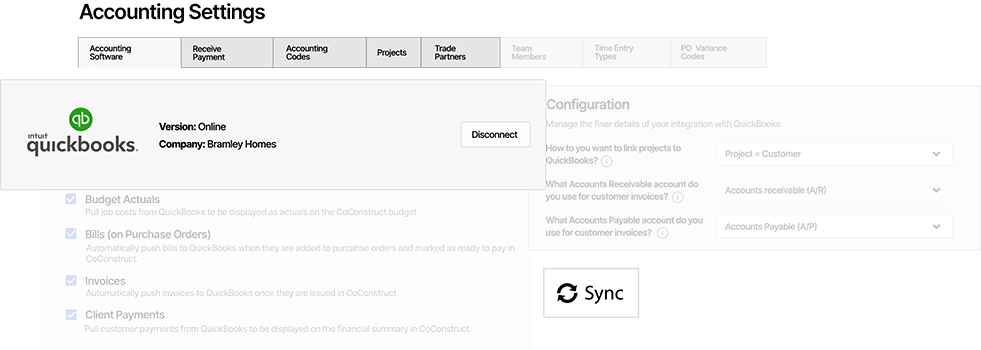
CoConstruct specializes in residential construction management for custom home builders and remodelers, with robust integration for both QuickBooks Online and QuickBooks Desktop. This software combines project management, client communication, and financial tracking in one platform.
The integration allows builders to push estimates, change orders, invoices, and purchase orders from CoConstruct to QuickBooks with just a few clicks. Budget actuals automatically pull from QuickBooks into CoConstruct for real-time cost tracking. The system supports both automatic and manual syncing, allowing users to control when data transfers occur.
CoConstruct handles the entire project lifecycle from initial estimates through warranty management. The estimating tools create detailed budgets that export directly to QuickBooks as items or services. Client selections, specifications, and change orders track in CoConstruct and generate corresponding invoices in QuickBooks. Purchase orders marked as verified in the field automatically create bills in QuickBooks, ensuring accurate timing of vendor payments.
For QuickBooks Desktop users, the integration operates through the Web Connector for automatic synchronization. QuickBooks Online Plus subscribers gain access to advanced features like budget actuals tracking, and purchase order integration. The system links projects to either customers or customer jobs in QuickBooks, providing flexibility for different organizational structures.
CoConstruct suits custom home builders and remodelers who need strong client communication tools alongside financial management. The CRM features help manage leads and prospects, while the job costing capabilities protect profit margins on fixed-price and open-book contracts. The integration keeps financial data flowing between field operations and accounting without requiring duplicate entry.

BuildTopia provides cloud-based construction management for residential homebuilders with seamless QuickBooks Online accounting integration. This ERP integration with QuickBooks eliminates double entry by allowing single-entry of data that flows automatically between systems.
The integration syncs vendor information, cost codes, project details, lot information, budgets, and approved purchase orders between BuildTopia and QuickBooks Online. Trade partner estimates and billing information update in QuickBooks automatically. The system manages complex builder operations including community planning, lot management, and construction scheduling.
BuildTopia’s single-entry estimating system allows each user to input information once, with that data flowing through vendor bids, cost codes, project budgets, and expenses to QuickBooks without manual re-entry. This approach significantly reduces administrative time and minimizes data entry errors.
The platform includes tools for scheduling, purchase order management, and warranty tracking. The integration maintains consistent accounting codes between systems, ensuring budget categories align properly. For residential builders managing multiple communities and spec homes, BuildTopia provides the coordination needed between sales, construction, and accounting teams.
The system works exclusively with QuickBooks Online, making it suitable for firms using cloud-based accounting. Setup includes configuring the sync settings, linking cost codes to QuickBooks products and services, and connecting projects to QuickBooks customers. The integration provides transparency in expense transactions and maintains accurate project financial tracking throughout the build process.
Selecting the right QuickBooks integration software depends on your company’s size, project types, and operational complexity. Small residential builders with straightforward projects may find CoConstruct or BuildTopia sufficient, as these platforms balance construction management features with QuickBooks integration without overwhelming smaller teams.
Mid-sized contractors handling commercial projects and government work should consider Lumber or Procore, which offer more robust compliance tools and multi-project management capabilities. Large firms or those with highly specialized needs may require Foundation’s comprehensive construction accounting platform, even though this represents a more significant departure from QuickBooks.
Evaluate your specific pain points before choosing a system. If payroll compliance and time tracking are your biggest challenges, Lumber’s specialized workforce management tools provide the most value. If coordination between project management and accounting teams causes friction, Procore’s collaborative features may help resolve it. For residential builders prioritizing client communication alongside financial management, CoConstruct offers the right balance.
Consider implementation complexity and training requirements. Some integrations require minimal setup and offer intuitive interfaces, while others demand more extensive configuration and user training. Factor in the total cost of ownership, including subscription fees, implementation costs, training expenses, and any required third-party connectors.
Thoroughly test the integration capabilities during evaluation. Verify that the system syncs the specific data types your company needs. Confirm that the sync frequency matches your operational requirements. Ensure the vendor provides adequate support during implementation and ongoing use.
Review the scalability of each solution. Your chosen system should accommodate business growth without requiring another platform change in a few years. Check whether the software handles multiple entities, locations, or business units if expansion is in your plans.
Integrating QuickBooks with construction-specific ERP software improves operational efficiency, financial visibility, and project profitability for contractors. Selecting the right integration that is compatible with QuickBooks or QuickBooks Enterprise eliminates duplicate data entry, reduces errors, and provides real-time insights that support better decision-making.
Each of the five systems covered offers distinct advantages depending on company size, project types, and specific operational needs. Lumber excels at workforce management and compliance. Procore provides comprehensive project management integration. Foundation offers complete construction accounting functionality. CoConstruct specializes in residential custom building. BuildTopia focuses on production homebuilders.
Before making a decision, assess your current processes and identify the gaps that software integration should address. Consider not just the features and cost, but also the implementation effort and ongoing support requirements. The best solution aligns with your operational workflows while providing room for growth.
Construction firms that successfully integrate their project management and accounting systems report significant time savings, improved cash flow management, and better project outcomes. Collaboration between field teams and accounting staff improves when everyone has access to consistent, real-time information. Profitability increases when job costs are accurately tracked and budget variances are identified early.
Take the time to evaluate your organization's integration readiness. Ensure your QuickBooks chart of accounts is properly structured for construction job costing. Verify that your team understands the benefits and is prepared for the transition.
Choose a solution that fits your scale and needs today while supporting your growth tomorrow.
QuickBooks ERP integration connects QuickBooks accounting software with construction-specific ERP systems, enabling automatic data synchronization between the two platforms. This integration eliminates duplicate data entry by syncing financial information, project costs, vendor records, employee data, and invoices between the construction management system and QuickBooks. The integration maintains QuickBooks as the core accounting platform while adding specialized construction features like advanced job costing, equipment tracking, and compliance management.
Construction companies need ERP systems integrated with QuickBooks because standard QuickBooks lacks the specialized tools required for construction project management. Construction firms must simultaneously track costs across multiple projects, manage complex subcontractor relationships, comply with union and prevailing wage requirements, monitor equipment utilization, and maintain detailed job costing records. Integrating an ERP system adds these construction-specific capabilities while preserving the familiar QuickBooks accounting interface and workflows that accounting teams already know.
The best ERP systems for QuickBooks integration depend on company size and project type. Lumber provides excellent workforce management and payroll compliance integration for general contractors. Procore offers comprehensive project management features with QuickBooks connectivity for commercial construction firms. Foundation Software delivers complete construction accounting for mid-sized contractors. CoConstruct specializes in residential custom home building with strong QuickBooks integration. BuildTopia focuses on production homebuilders using QuickBooks Online. Each system offers distinct advantages based on specific operational requirements.
QuickBooks-compatible ERP software delivers multiple benefits for construction firms. These systems eliminate double data entry by automatically syncing information between platforms, reducing errors and saving administrative time. They provide real-time visibility into project costs and profitability, enabling better decision-making. Integrated systems improve collaboration between field and office teams by ensuring everyone accesses the same financial data. They enhance cash flow management through accurate tracking and reporting. Most importantly, they allow construction companies to add specialized functionality without abandoning their existing QuickBooks accounting infrastructure.